

Ghostmark
macOS · Menu bar
Share your screen with your name and today's date tiled across it, so a leaked frame points home
Available
macOS · Menu bar
Glance at the menu bar and see how long you have actually been at the screen today
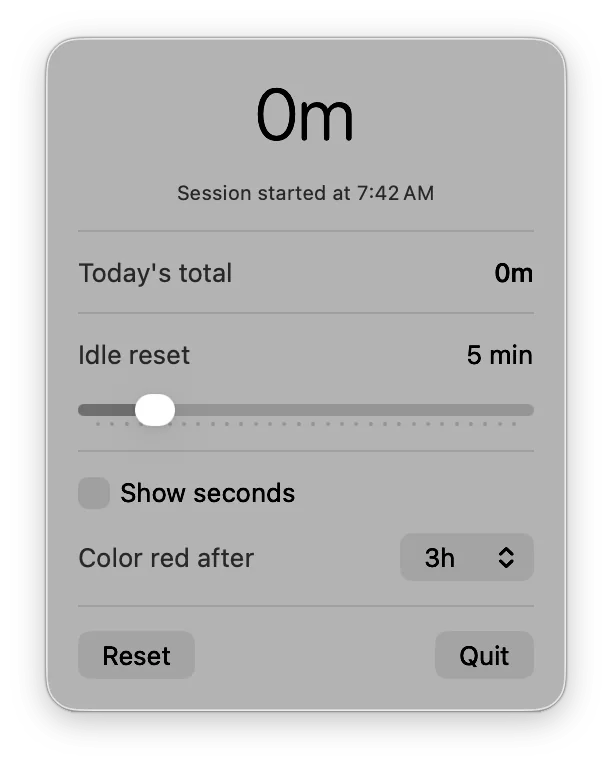
Aware sits in your menu bar and continuously tracks how long you've been actively using your Mac. It detects mouse and keyboard idle time with a configurable threshold, automatically pauses tracking when you step away, and resets daily at midnight. See your elapsed session time at a glance in the menu bar — with optional seconds display and a red color indicator when you've been going too long.
Anyone who wants to stay conscious of their screen time without invasive tracking.
The code is public, but there's no packaged release yet. Build it from the repository today, or leave an email and hear when there's one you can double-click.
macOS · Menu bar
Share your screen with your name and today's date tiled across it, so a leaked frame points home
macOS · Menu bar
Start a long build and everything else steps out of the way until it has finished
macOS · Menu bar
Hear that your email turned up in a breach from your own Mac, not from a stranger's login
macOS · Menu bar
See which app is drawing the most power right now, and what that costs in carbon
macOS · Menu bar
The banner slid away before you read it — Catch keeps every notification so you can go back
macOS · Menu bar
Notice it is 6pm and not 9pm — every hour arrives as a chime and a panel from the notch
macOS · Menu bar
The thing you copied three copies ago, back at your cursor without leaving the app
macOS · Menu bar
Hand someone your Mac without handing over Messages — the apps you pick ask for Touch ID
macOS · Menu bar
Know how much hotspot data is left while you can still do something about it
macOS · Menu bar
Find the paragraph you typed into a box that lost it, encrypted and searchable on your own Mac
macOS · Menu bar
See every extension and plugin quietly running on your Mac, and switch off the ones you did not ask for
macOS · Menu bar
See which repos have uncommitted work before standup, without cd-ing through all of them