ClipShelf
Protect your apps from accidental quits while ClipShelf protects your clipboard
macOS · Menu bar
You meant Cmd+W and hit Cmd+Q — now the keys have to be held down before anything quits
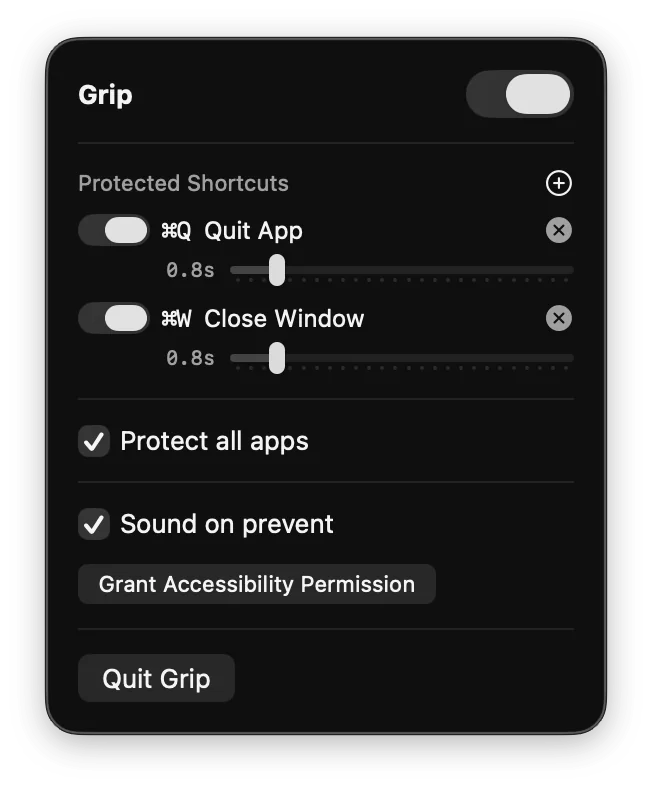
Grip intercepts Cmd+Q at the system level and requires you to hold it for a configurable duration (0.5–3 seconds) before the quit goes through; Cmd+W (off by default) and shortcuts you add can be protected the same way, each with its own hold. A green progress ring appears at your cursor — release early and the quit is canceled. Comes pre-configured to protect Safari, Chrome, Firefox, Arc, VS Code, Xcode, Slack, Finder, Mail, Messages and more. Toggle protection for all apps or manage your list individually. Sound feedback and zero dock footprint.
Anyone who's ever lost work to an accidental Cmd+Q.
Grip uses an active CGEventTap at the session level, because AppKit's global event monitor can only watch keystrokes, not stop them.
The tap swallows ⌘Q and starts the hold. When the ring fills, Grip builds a fresh key-down and key-up from the saved shortcut and sends them straight to the app with CGEventPostToPid, which arrives after session taps, so Grip never catches its own quit. If macOS disables the tap for being slow, Grip turns it back on.
The full write-upIntercept Cmd+Q with a CGEventTap and repost it without a loopThe code is public, but there's no packaged release yet. Build it from the repository today, or leave an email and hear when there's one you can double-click.
macOS · Menu bar
Share your screen with your name and today's date tiled across it, so a leaked frame points home
macOS · Menu bar
Start a long build and everything else steps out of the way until it has finished
macOS · Menu bar
Glance at the menu bar and see how long you have actually been at the screen today
macOS · Menu bar
Hear that your email turned up in a breach from your own Mac, not from a stranger's login
macOS · Menu bar
See which app is drawing the most power right now, and what that costs in carbon
macOS · Menu bar
The banner slid away before you read it — Catch keeps every notification so you can go back
macOS · Menu bar
Notice it is 6pm and not 9pm — every hour arrives as a chime and a panel from the notch
macOS · Menu bar
The thing you copied three copies ago, back at your cursor without leaving the app
macOS · Menu bar
Hand someone your Mac without handing over Messages — the apps you pick ask for Touch ID
macOS · Menu bar
Know how much hotspot data is left while you can still do something about it
macOS · Menu bar
Find the paragraph you typed into a box that lost it, encrypted and searchable on your own Mac
macOS · Menu bar
See every extension and plugin quietly running on your Mac, and switch off the ones you did not ask for